Features
Everything your team needs. Nothing in the way.
Simple tasks, thoughtful follow-ups, and clarity when work needs attention.
Pinok has six core features: quick add, hand-offs that come back, Following for what others hold, Needs you for what waits on you, approvals, and projects with three roles on every task. Everything else stays out of the way until you need it.
-
Quick add
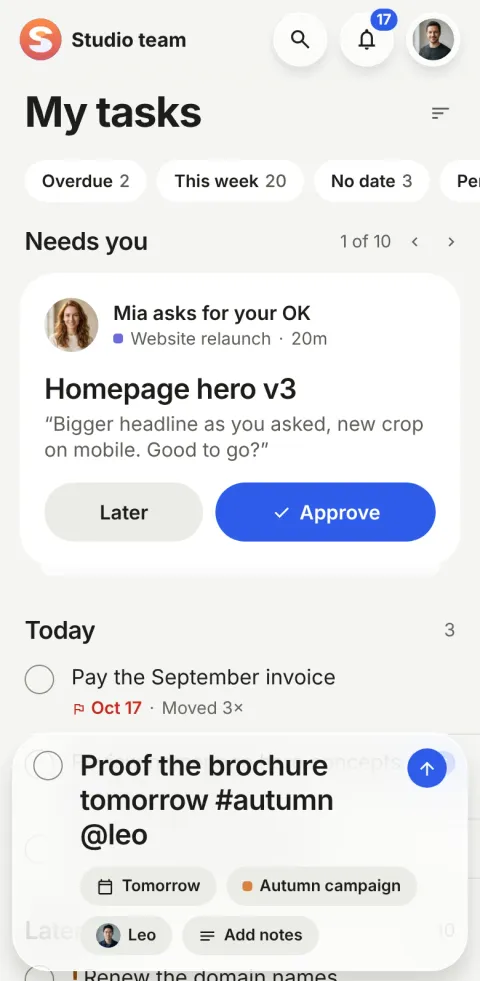
Type what needs doing, the way you’d say it. The date, the project and the person are picked out as you type.
- Tap +
- Type one sentence
- Press return
-
Hand off
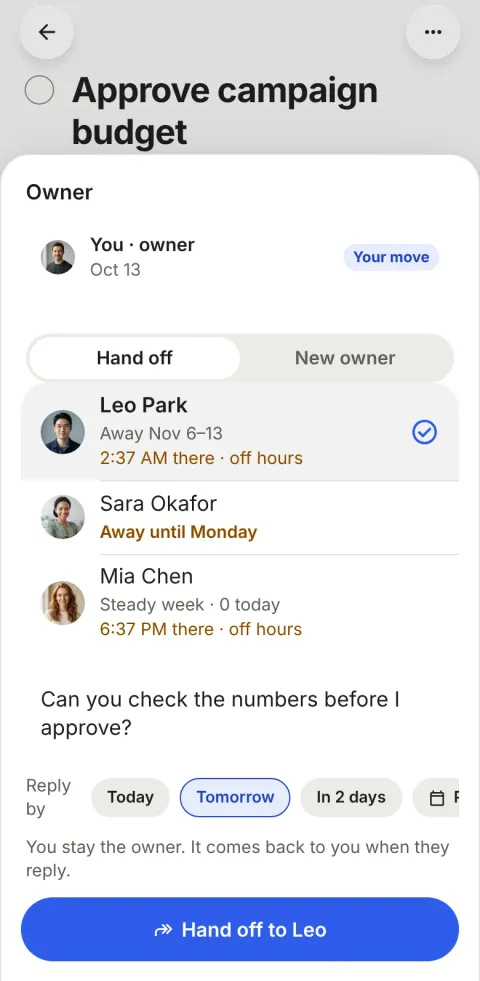
Pass the next step to a teammate with a note. You stay the owner, and the task returns to you when they reply.
- Hand it off with a note
- Add a reply-by day, if it matters
- Leo sees it in Needs you
-
Following
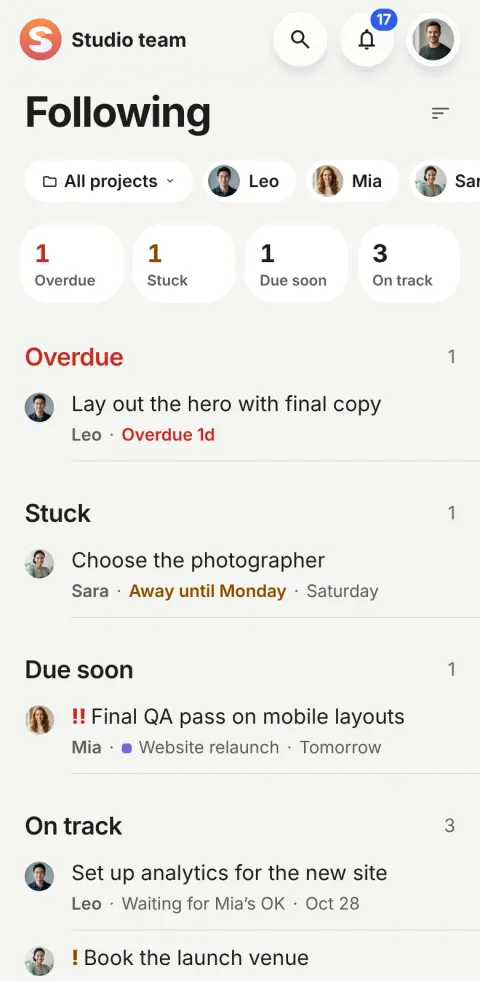
Following is for the work you care about but someone else holds. Four numbers on top, then the tasks, worst first.
- You follow automatically
- Four numbers say how it’s going
- Each row says why
-
Needs you
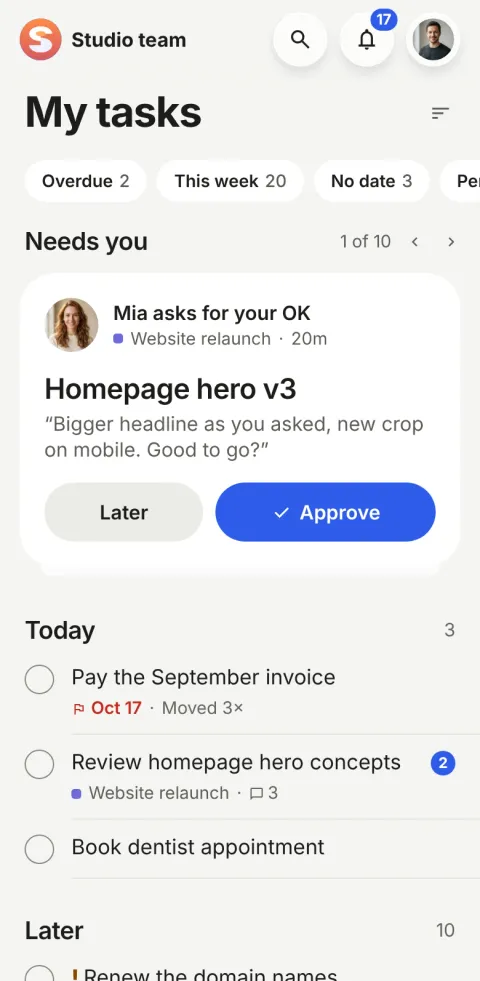
Everything that waits for your action is in one place, and nothing else is. Each card says why, and carries its one action.
- Open the app, see the top card
- Act in one tap
- Or put it at the back
-
Approvals
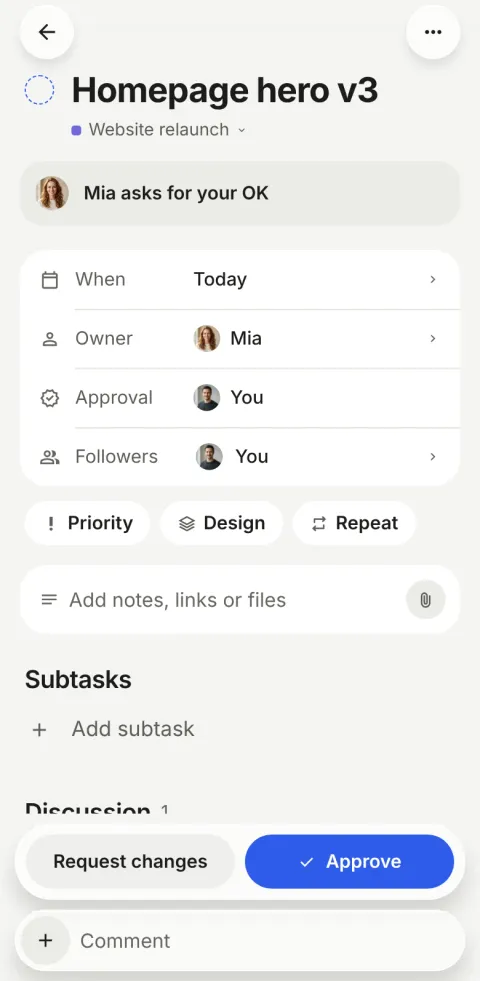
Any task can have an approver. Checking it off sends it to them, and they Approve or Request changes, in one tap.
- Add an approver
- The owner checks it off
- The approver decides
-
Projects and people
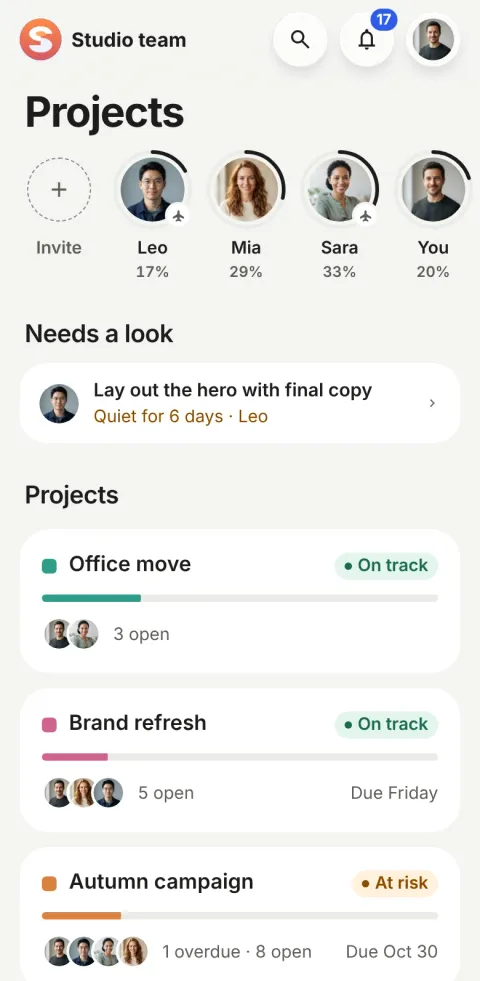
A name, a colour and the people on it. Health is worked out from the dates, so nobody writes status reports.
- Name it, say what it’s for
- Add people
- Read it at a glance
On the web
The same workspace, at your desk
In a browser, Pinok is laid out for a big screen: a sidebar, the task open beside its list, dialogs instead of sheets, and the keyboard for everything.
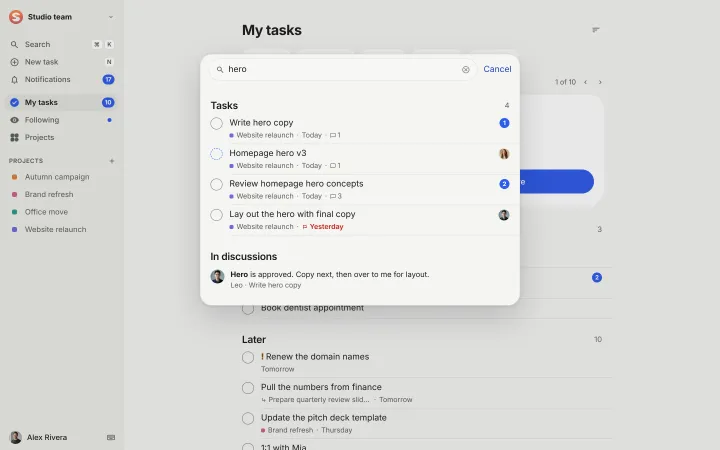
- ⌘K
- Search everything
- N
- New task
- JK
- Next and previous task
- X
- Complete, with Undo
- E
- Rename
- ?
- All the shortcuts
Also in the app
Smaller things, each where you’d expect it.
-
Subtasks
One level deep, each with its own owner and date. A small pie shows how many are done.
-
Repeats and reminders
Every weekday, every 2 weeks, every Monday. Reminders ring on your phone at the time you pick.
-
Photos and files
On the task and in comments, up to 25 MB a file. Photos open full screen.
-
Notes
Formatted notes with bold, italic and lists, saved as you type.
-
@mentions, replies and reactions
Mention a teammate, answer a comment, or just leave a 👍 instead of “Thanks”.
-
Notifications
The bell lists what happened by day, unread first. Pushes for what needs you now; the rest in a morning summary.
-
Buttons on the push
Approve, Reply, Got it and 👍, right from the notification on iPhone and Android.
-
Unread on tasks
A count or a dot on the row, and a “New” line on the task, so you read where the work is.
-
Priority
None, High (!) or Urgent (!!). Urgent and high lead every list.
-
Away
Set the days you’re out. Reminders and nudges wait, and quiet days don’t count against you.
-
Work days and time zones
Work days per workspace; a teammate’s local time when it differs from yours.
-
Several workspaces
Your team and a client’s, one tap apart, each with its own projects and people.
-
Calendar feed
Your dated tasks in Apple Calendar, Google Calendar or Outlook, kept up to date by themselves.
-
Import and export
Bring work from Asana, Todoist, Trello or a CSV (on the web); export a project or back up the workspace.
-
Search
Tasks and comments, searched as you type, from the magnifier in every header or ⌘K on the web.
-
Undo, not “Are you sure?”
Anything that removes something happens at once with Undo. Only deleting asks first.
-
Offline first
Every change applies on your device at once and syncs in the background.
-
Light and dark
Both themes, designed together, with every text pair at 4.5:1 contrast.
What did we leave out, and why?
Less to learn is a feature. These are missing on purpose.
-
Boards and columns
Status follows what people do, so there is nothing to drag.
-
Custom fields
A task has a date, an owner, a project and a priority. That’s enough.
-
Automations
The rules are fixed and the same for everyone, so nobody maintains them.
-
Templates
Starting a project is a name, not a choice of template.
-
Status reports
Project health is worked out from the dates.
-
Sprints, issues, epics
Words for software teams; ours are for every kind of team.
Need one of these? Read the fair comparisons with Asana, Todoist and Trello.
Get started
Give your team a task. Leave the chasing to Pinok.
Less setup. Fewer follow-ups. A clearer way to get things done together.
Free for small teams · iPhone, Android and the web · Teams of 2–20
Get Pinok