For studios
For studios where every detail gets a second look
Concepts, rounds, mood boards and site visits. The reviews are many and the studio is small, so every review should come back without anyone chasing it.
How do studios use Pinok?
For a design or creative studio, Pinok keeps reviews moving. Work goes to an approver in one tap and comes back with “Request changes” and a note, photos and files sit on the task, and the ring around each face shows who is at capacity this week.
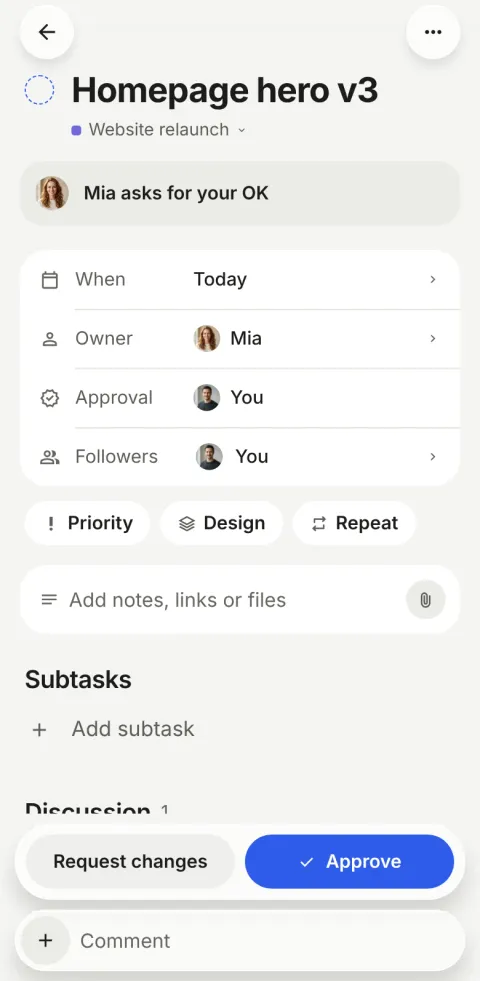
A week at a five-person studio
-
Monday
Mia uploads three concepts to “Homepage hero v3” as photos in a comment: “I lean towards B.”
-
Tuesday
Leo replies “+1 on B. Let’s ship it.” Mia checks the task off; it goes to Alex for his OK.
-
Wednesday
Alex is on a site visit. The push has an Approve button; it’s done before he’s back in the car.
-
Thursday
Sara is away until Monday. Her face wears a small plane, and her quiet days don’t count against her.
-
Friday
The Brand refresh project reads “On track”, worked out from its dates. The studio goes home on time.
A made-up team, using the app as it works today.
What studios get from it
-
Reviews in one tap
Approve or Request changes from the card, the task or the push.
-
Files where the work is
Photos and files on the task and in comments: up to 25 MB a file, 5 MB a photo.
-
Capacity at a glance
Each face in a ring of how much of their week is done, and “Needs a look” for anyone whose week is full.
-
Notes that read well
Formatted notes with bold, italic and lists, written right on the phone.
Questions, answered
What is a good project app for a small design studio?
One the whole studio will actually open. Pinok is built for small teams and focuses on reviews and hand-offs: approvals in one tap, files on the task, and nothing to configure.
How large can attachments be?
Up to 25 MB for a file and 5 MB for a photo (JPEG, PNG, WebP or HEIC). Files are stored privately and shown through short-lived links.
Can I review work on my phone?
Yes. Pinok is built for the phone first: photos open full screen, and Approve or Request changes sit right over the comment bar.
Compare, and other teams
- Pinok vs Asana Asana is built to run work across a whole company. Pinok is built for one small team that wants less to manage. Here is an honest look at both.
- Pinok vs Trello Trello made boards friendly for everyone. Pinok takes a different path: no columns, and every task in one person’s hands.
- For agencies Client work that changes hands with a note, approvals for sign-off, nothing waiting unseen.
- For startups Everyone sees what needs them; founders see what is stuck. No status meeting.
Get started
Give your team a task. Leave the chasing to Pinok.
Less setup. Fewer follow-ups. A clearer way to get things done together.
Free for small teams · iPhone, Android and the web · Teams of 2–20
Get Pinok