Needs you
Only what needs you
Everything that waits for your action is in one place, and nothing else is. Each card says why, and carries its one action.
What is Needs you?
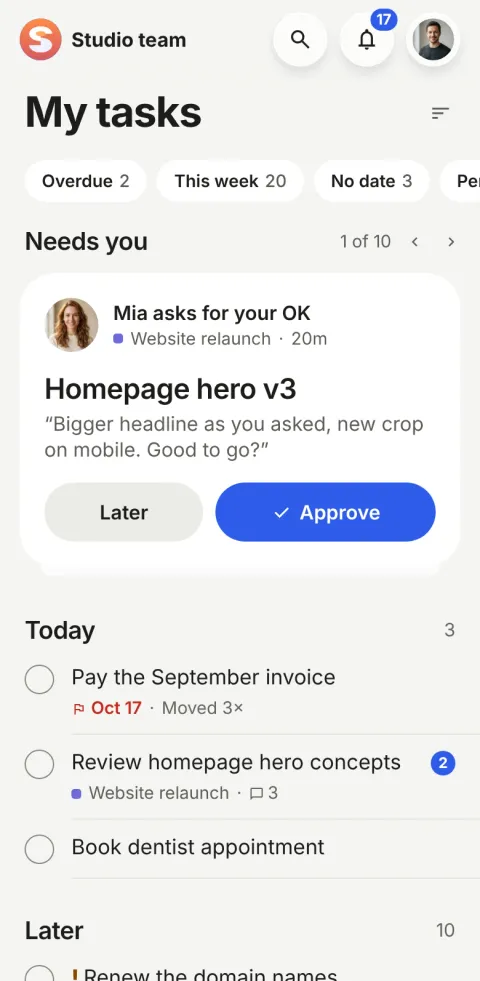
Needs you is the top of My tasks in Pinok: a deck of cards with everything that is waiting for your action, and nothing that isn’t. Each card says why in one short line (“Mia asks for your OK”) and carries its one action, so the next thing to do is always one tap away.
How does Needs you work?
-
Open the app, see the top card
Needs you sits above everything else in My tasks, with its count. The card shown is the one to deal with now.
-
Act in one tap
Approve, Reply, Got it, Nudge: the card carries the right action for its reason. Reply opens the task with the keyboard already up.
-
Or put it at the back
Later moves the card to the back of the deck. It stays; it just isn’t first. “2 of 5” and the arrows let you look through the rest.
The details
-
Every reason in plain words
“New · from Mia”, “Mia asked you”, “Waiting for your OK”, “Sent back by Leo”, “Ivan is waiting on you · 2d”, “Leo handed it to you · reply by Thu”, “No reply from Leo yet”, “Check: client reply”.
-
Here, and only here
What needs you is never repeated in Following or anywhere else, so there is one list to clear, not three.
-
Then your day
Under the deck: Today (overdue first; more than five reads “Full day”, never a block), Later, and Waiting for what you handed off or sent for an OK.
-
Filters, not folders
Overdue, This week, No date, Personal and Completed. Captured tasks without a date wait under No date; there is no separate inbox.
-
Urgent first
Priority is three words: None, High (!) and Urgent (!!). Urgent and high lead every section; there is nothing else to configure.
-
Read is read everywhere
Opening a task reads it in the bell too, and clearing the bell reads its tasks. The badge and the bell always agree.
On the web
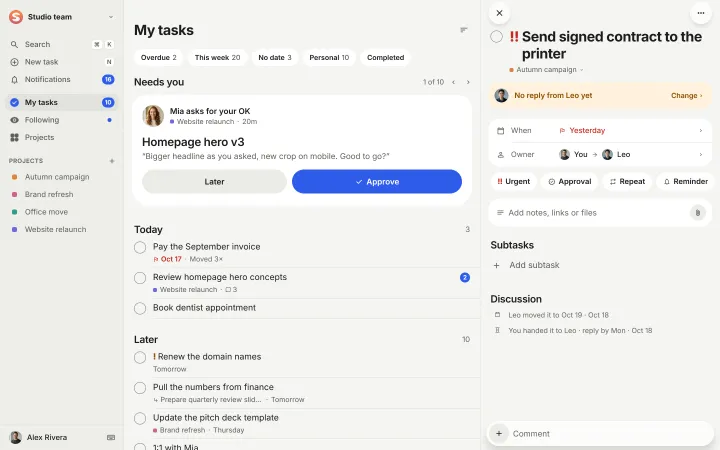
On the web, the deck sits on top of My tasks, and the task you open stays beside it.
Questions about Needs you
Is Needs you the same as notifications?
No. The bell lists what happened around you. Needs you lists what is waiting for you to act. They stay in step: dealing with a task in one clears it in the other.
Can I hide a card I can’t deal with now?
Tap Later. The card goes to the back of the deck and the next one comes up. Nothing is snoozed or lost.
Does Needs you work for personal tasks?
Personal tasks live in Today and Later like any other. Needs you is about other people: something given to you, a question, an approval, a hand-off.
Compare and use cases
- Pinok vs Asana A fair comparison, as of October 2026.
- Pinok vs Todoist A fair comparison, as of October 2026.
- For startups Everyone sees what needs them; founders see what is stuck. No status meeting.
- For agencies Client work that changes hands with a note, approvals for sign-off, nothing waiting unseen.
Get started
Give your team a task. Leave the chasing to Pinok.
Less setup. Fewer follow-ups. A clearer way to get things done together.
Free for small teams · iPhone, Android and the web · Teams of 2–20
Get Pinok