Projects and people
Projects, people and three roles
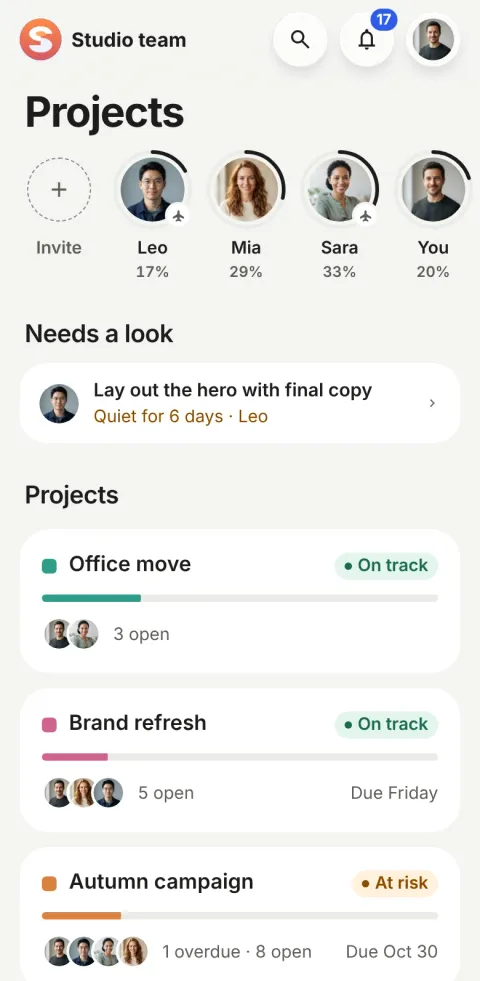
A name, a colour and the people on it. Health is worked out from the dates, so nobody writes status reports.
What are projects and people?
In Pinok, a project is a name and the people working on it; its health (on track, at risk, behind) is worked out from the dates. Every task has three roles: one owner, an optional approver and any number of followers. People on a project are admins or members.
How do projects and people work?
-
Name it, say what it’s for
New project: a name and a colour. Whoever creates it is its admin. No template to choose, no statuses to configure.
-
Add people
Invite by email, or pick from your contacts on a phone (they stay on the phone). Everyone’s face shows how much of their week is done.
-
Read it at a glance
A status pill from the dates and the progress, then the work. “Since you last looked” sums up what teammates did while you were away.
The details
-
One owner per task
Every task has exactly one owner. The approver and followers are context, never a second owner.
-
Admins and members
Admins change the project and its people; members do everything with tasks and may leave. A project always keeps an admin.
-
Stages, if it’s big
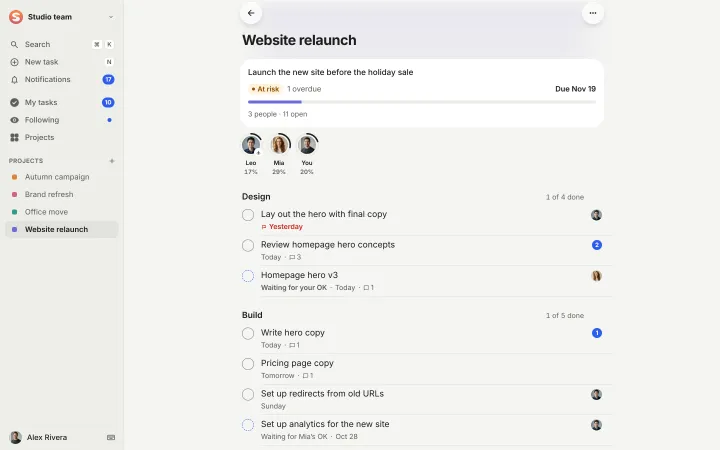
An optional order of stages (Design → Build → Launch), each with how much is done. No columns, no dragging, no statuses to set up.
-
Personal tasks stay private
A task outside a project is visible only to its creator, owner, approver and followers. Nobody else sees or counts it.
-
Subtasks, one level deep
Each with its own owner and date. No nesting to manage, no checklists to keep in sync.
-
Quiet projects ask once
A project with no movement for a month asks its owner, in place: “Quiet for a month · Keep · Archive”.
On the web
A big project can have stages (Design, Build, Launch): quiet headings, not a board.
Questions about projects and people
Are there boards, Gantt charts or custom fields?
No, on purpose. Pinok keeps one way of looking at work: lists that say who has the next step and what is stuck. If your team plans in boards or timelines, a tool like Trello or Asana will suit you better.
Who can see a personal task?
Only its creator, its owner, its approver and its followers. A personal task never shows up in anyone else’s counts.
How is project health worked out?
From the dates, by a fixed rule. Behind: the project is past its due date with work open, two or more tasks are overdue, or one is two days late. At risk: one task just went overdue. On track: everything else. It shows as a coloured pill, so nobody writes a status update.
Compare and use cases
- Pinok vs Asana A fair comparison, as of October 2026.
- Pinok vs Trello A fair comparison, as of October 2026.
- For agencies Client work that changes hands with a note, approvals for sign-off, nothing waiting unseen.
- For startups Everyone sees what needs them; founders see what is stuck. No status meeting.
- For studios Reviews in one tap, files on the task, and who is at capacity at a glance.
Get started
Give your team a task. Leave the chasing to Pinok.
Less setup. Fewer follow-ups. A clearer way to get things done together.
Free for small teams · iPhone, Android and the web · Teams of 2–20
Get Pinok