Following
See where it’s stuck, without asking
Following is for the work you care about but someone else holds. Four numbers on top, then the tasks, worst first.
What is Following?
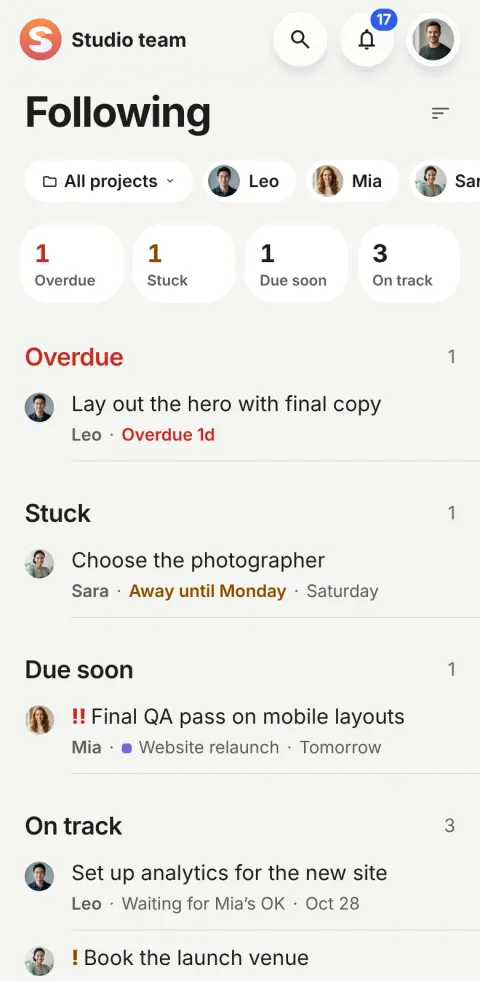
Following is the Pinok tab for work you care about but someone else holds: tasks you gave to someone, made for someone, or chose to follow. It has no actions on purpose. Four numbers sit on top (overdue, stuck, due soon, on track), then the tasks, worst first. A task counts as stuck after 3 quiet work days.
How does Following work?
-
You follow automatically
When you give a task to someone, create it for someone or are made its approver. Any other task you can open is one tap to follow.
-
Four numbers say how it’s going
Overdue, stuck, due soon, on track. A tap on a number shows only that group.
-
Each row says why
The owner’s face and name, then the reason: “Overdue 2d”, “Quiet for 4 days”, “Away until Monday”, and “Moved 2×” when the date keeps slipping.
The details
-
What “stuck” means
Blocked by a task or something else; no movement for 3 work days; waiting on someone for 3 work days or past its reply-by day; or its owner is away until after its date.
-
A fixed rule, not a setting
Three quiet work days is the same for everyone. The only thing to set is the workspace’s work days (Monday to Friday by default).
-
Watching, not acting
There is no Remind button. Anything that needs your action, like an approval, is in Needs you instead, so Following stays a calm view.
-
Hand-offs stay yours
A task you hand off keeps you as its owner, so it waits in your My tasks under Waiting, and comes back to Needs you if its reply-by day passes.
-
Away pauses the pressure
While someone is away, quiet days don’t count against them and reminders wait. “Away until Oct 28” shows wherever their face does.
-
A morning summary, not a stream
New tasks, comments and changes on what you follow arrive once a day, in a morning summary on your phone (09:00 by default). What needs you comes at once.
On the web
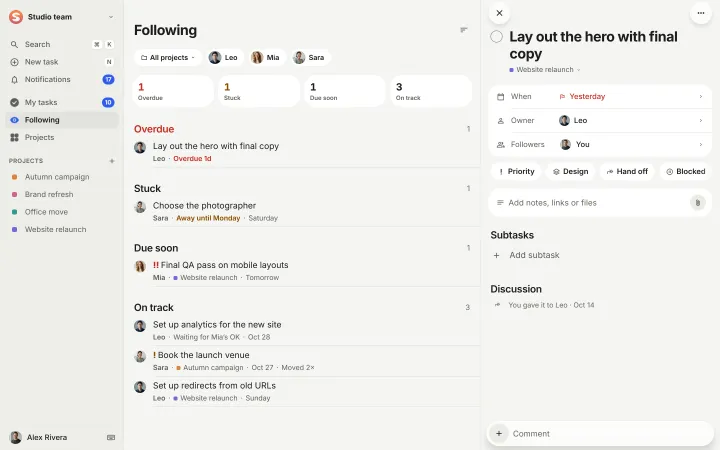
On the web, a task opens beside the list, so you can read it without losing your place.
Questions about Following
When does a task count as stuck?
When it is blocked by a task or something else, when nothing has happened on it for 3 work days, when it has waited on someone for 3 work days or past its reply-by day, or when its owner is away until after its date.
Can I change the 3 days?
No. It is a fixed rule so that “stuck” means the same thing to everyone. The workspace owner sets which days are work days, and Pinok counts only those.
Who can see what I follow?
Followers are visible on the task to people who can open it. Following a task never gives you access to a task you couldn’t open before.
Compare and use cases
Get started
Give your team a task. Leave the chasing to Pinok.
Less setup. Fewer follow-ups. A clearer way to get things done together.
Free for small teams · iPhone, Android and the web · Teams of 2–20
Get Pinok